How to jump-start Office 365 active usage and user acceptance?

Is your new Office 365 still a data island? You can highly increase the benefits of any Office 365 plan by external data integration and document synchronization with 100+ typically local and cloud-based IT-systems and apps. Connect you existing enterprise backend systems without any programming: one-way or two-way, and without any changes in the connected systems.

FOLLOW THESE STEPS TO RELEASE OFFICE 365 POTENTIAL BENEFITS

Publish IT backend data to the cloud for easy access

Make external data available for collaboration, change notifications and workflows, search, reporting, mobile and offline access on any devices. Provide up-to-date information from your enterprise backend systems in an easy to use collaboration environment, such as SharePoint Online.

Scalable cloud-based data acquisition into your backends

Use the new Office 365 cloud for scalable and reliable data and file acquisition to local systems, such as file shares, SQL, ERP, CRM and others. What you need - it's all there: forms, workflows, notifications, lists, and libraries.


Let your data and files flow cross-vendor or cross-app

Connect clouds of different vendors, systems, and apps without programming. You don't need to change anything in the connected systems.Just keep your data and files in sync automatically.

Structured or unstructured data - anything goes

Structured data (e.g. from databases, ERP, CRM, and 100+) as well as unstructured files / documents are supported.

Migration, Backup, and Hybrid Synchronization

Use it for fast data and file migration, backup to local or to cloud, or permanent hybrid two-way synchronization. Add metadata from NTFS or database. Select the data sets very flexible using query languages like SQL, XPath, OData, and more.

All under your full control

Run a Windows Service locally or in the cloud to keep your data and files in sync. No 3rd party vendor or cloud involved, just direct and secure connections. Centrally manage hundreds of connections with flexible logging and alerting.

All Office 365 Plans and Services supported

All Microsoft plans and systems supported: Office 365, SharePoint Online, OneDrive 4B, Office Groups, SQL, Dynamics, Azure etc. Many authentication methods supported like Microsoft Account, Windows Live or ADFS.


Cost-effective licensing 499€ one-time fee

Cost-effective licensing per installation. No user CALs required. No data volume-related costs. Can be used with any Office 365 tenant or site. Low one-time fee starting with EUR 499. Several editions available.

How it works

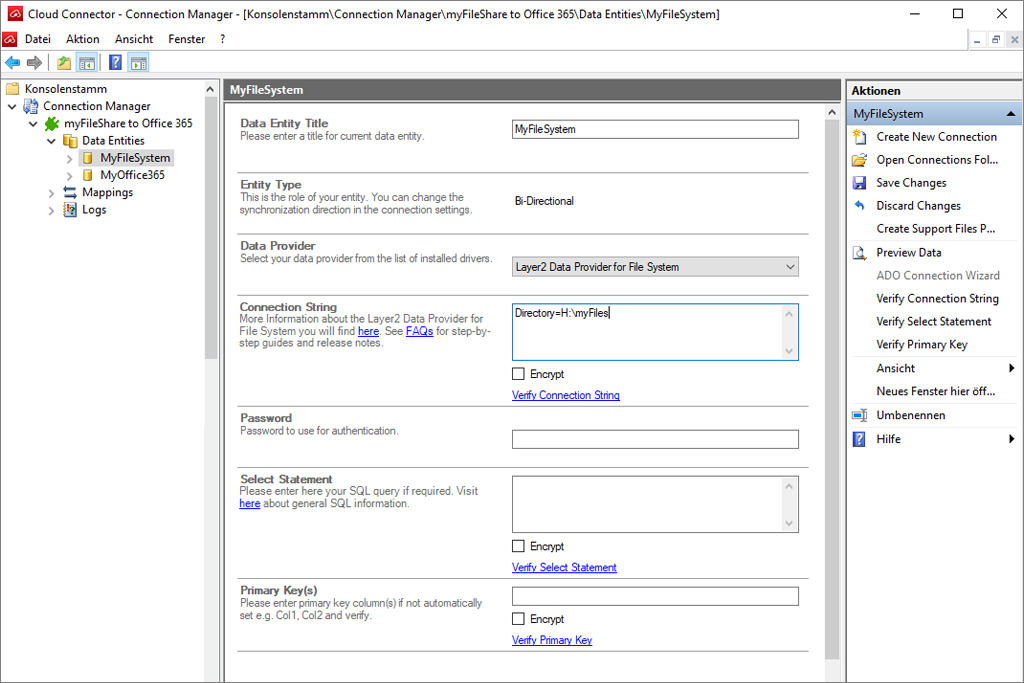
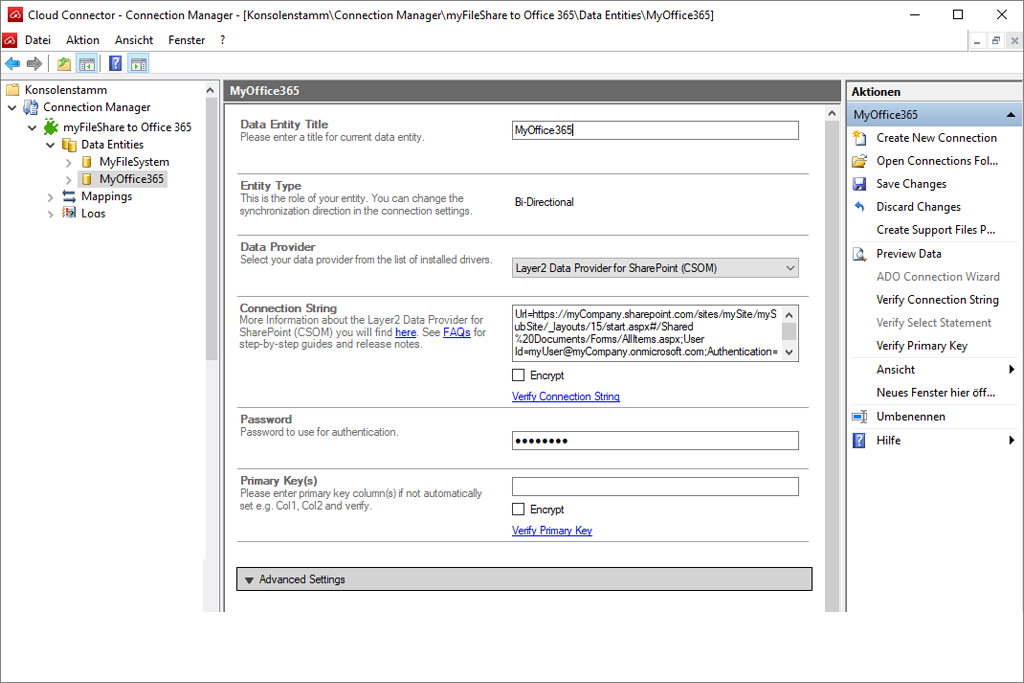
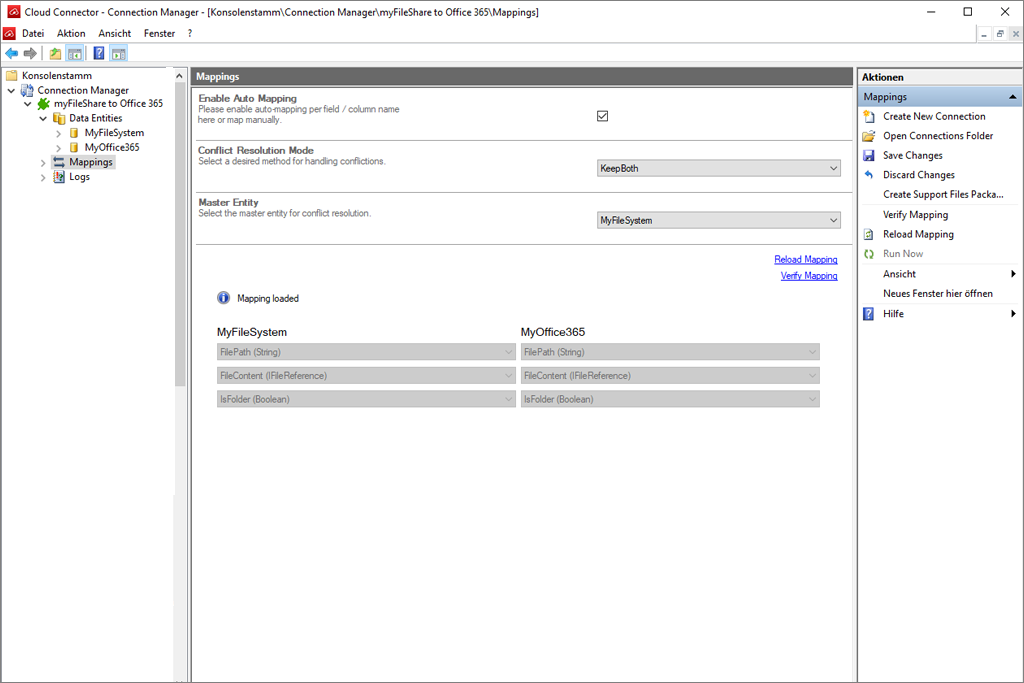
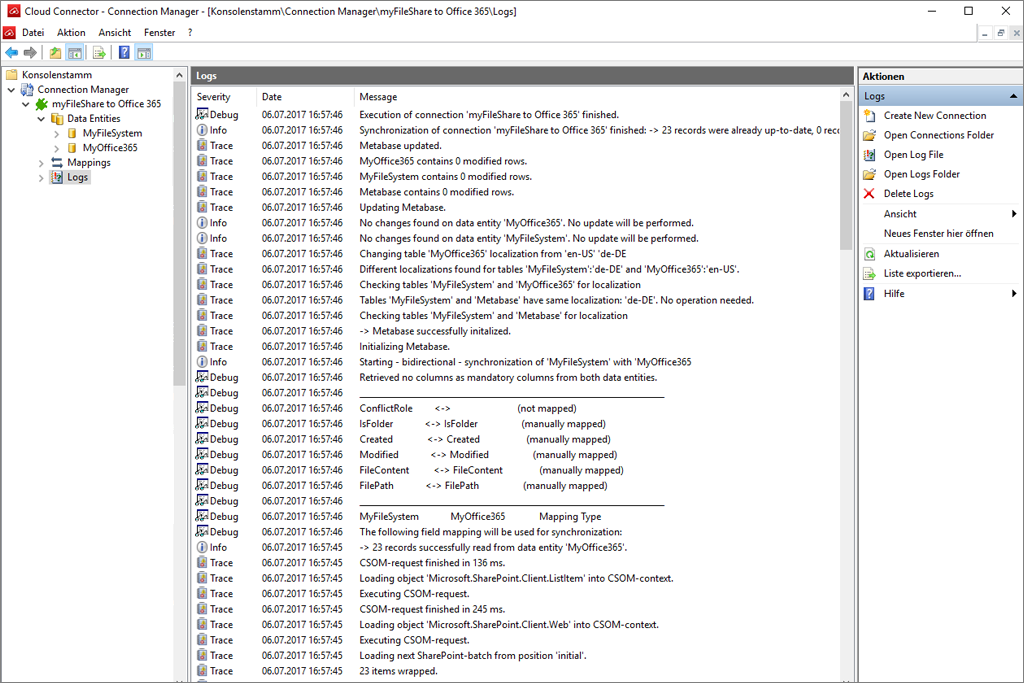
Take a look at the screens to get a first impression.
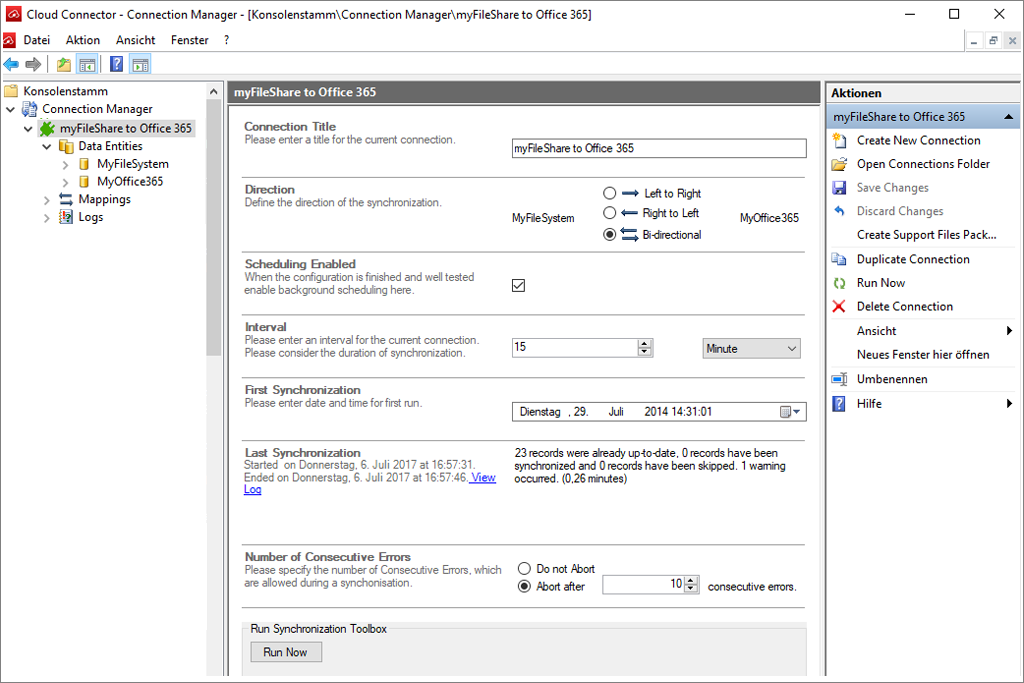
Screenshot of Layer2 Cloud Connector connection manager with a connection sample.
Screenshot of Layer2 Cloud Connector connection manager while entering a connection string.
Acreenshot of Layer2 Cloud Connector connection manager view when all fields are filled.
Screenshot of mapping sample in Layer2 Layer2 Cloud Connector Mappings.
Screenshot of sample logs in Layer2 Cloud Connector.

What you need

You can make use of the Layer2 Cloud Connector to keep your Office 365 and SharePoint Online data in sync with 100+ other systems and apps.

Frequently Asked Questions

Which Office 365 Plan do I need?

Layer2 data integration and file sync is not bound to any specific Microsoft Office 365 Plan. It works for any plan. It does not need any installation of apps or configuration changes in the cloud, just read / write access, depending on requirements.

How to integrate my specific app?

The Layer2 Cloud Connector comes with a wide range of common data providers, drivers, and support for standard protocols. It also works with many vendor-specific or 3rd party providers. There are good chances to find your desired system in our solutions directory. If it's not listed: No problem, contact us to add it, if possible.

Can I use it for on-premises?

Generally, yes - you can do. It works for SharePoint on-prem in the same way as for SharePoint Online. But take a look at the Layer2 Business Data List Connector before. It is highly optimized for on-premises use and more easy to manage, depending on requirements.

I am thoroughly impressed with your Cloud Connector software. It is an excellent concept, has extremely comprehensive functionality and is easy to configure.
Brent Seeney, ROI Technologies
The Layer2 Cloud Connector works as advertised and fit very well with my customer’s needs. It was easy to install and configure and the support was responsive and on the mark.
Tim Schwartz, President, ProNet Solutions Group, LLC
We really like the ease of use to synchronize SQL Server data and Office365 through the DMZ. It makes it easy to display ERP system data in the cloud and prepares the way for products like Microsoft Power BI Dashboards and Charts in SharePoint.
Levi Lohnes, Buchanan & Edwards
We have used the Layer2 Cloud Connector and it has really impressed the team at MindPoint. We are keen to use this product in our customer solutions.
Jason Firth, Managing Director, MindPoint
The Layer2 Cloud Connector is a flexible tool which enables us to be responsive to the demands and requirements of our customers.  With Layer2 we are able to develop powerful SharePoint business solutions in a fast, efficient and productive manner.
Barry German, Technical Director, Frontline
The Layer2 Cloud Connector for SharePoint Online will allow BTL to take an innovative and market leading solution to our customers. It opens new doors to the situations that Office 365 can be effectively deployed in to.
Phil Evans, Operations Director, BTL Communication
Cloud connector for Office 365 and SharePoint is an easy to install, no coding required, highly effective solution enabling a stable synchronization between ERP data and SharePoint heightening productivity in our development.
Jiha Yi, Marketing Manager,Feelanet Co., Ltd.
Layer2 Cloud Connector is simple to set up, very stable and gives us the necessary connection between our local data and SharePoint Online.
Terje Haug, Serit IT Partner
The Layer2 Cloud Connector and Business Data List Connector helps our clients in unifying their platforms without excessive investments and get the best out of SharePoint, on-premise and online.
Han Beusker, 4i Solutions
​​Layer2 Sharepoint Connector allows our customers to integrate the Sharepoint environment with different data sources. It is particularly appreciated the feature that allows the integration with the file system.
Jessica Prearo, Pentalab Srl.
The Layer2 Cloud Connector helps us to add value to the Microsoft Cloud offerings and create business solutions for E4D customers with seamless external data integration.
Idan Goldshlager, CEO, E4D Solutions LTD
The Layer2 Cloud Connector is the best integration software for local SharePoint Server and also SharePoint Online and Office 365.
Kai Halonen, Pilvilampi Software Oy
We are very excited about the features and flexibility that Cloud Connector provides to our customers, it synchronizes data easy and comfortable.
Michael Trankjær, IT Eksperten ApS
The Cloud Connector has provided us with a robust and code-free mechanism to seamlessly integrate SAP BW, SAP ERP, SQL Server and SharePoint applications.
Rodolfo Bermúdez, Consulting Manager, Intellego
Our clients use the Layer2 Cloud Connector to overcome the shortcomings of Microsoft Office 365 and OneDrive for Business.
Dan Frederick, Claritech Solutions Corp.
We have implemented the Layer2 Cloud Connector for the www.grupoalltech.com.br company to provide line-of-business product data in Office 365 and to seamlessly integrate business processes.
Odair Bourscheidt, Inconnect Tecnologia
Microsoft SharePoint Online ne permet pas de synchroniser les dossiers d’un File Server sur SharePoint. Nous avons donc choisi Layer2 Cloud Connector pour ajouter cette fonctionnalité à nos projets.
Gilles Dedisse, Chef de Projets, Orditech
Our go-to Layer2 Product is the Cloud Connector. It is an extremely flexible and versatile tool that we've incorporated as part of a larger solution for several of our key customers and internally.
Drew Keenan, Director, Total Calibration
The Layer2 Cloud Connector for Office 365 and the Layer2 Business Data List Connector for SharePoint provide rich options for LOB integration and hybrid ‘on-premise’ to ‘Office 365’ connectivity.
John Ackery, Director, Devworkz Pty Ltd
Layer2 Cloud Connector has been an invaluable tool that allows us to provide our clients with a robust, reliable solution to connect SharePoint with external data sources.
Mike Adkins, Director, RSM US LLP

Use Microsoft development tools in full – low-code at low cost.

Oct 22, 2021, 12:07 by User Not Found

First things first: Why use Microsoft Power Apps and Microsoft Power Automate? You can create apps, workflows, and custom, interactive forms in SharePoint to streamline processes. Power Apps is a development platform for apps, mobile and web. Develop and reach app results in a simpler way than with high-end development tools, because Power Apps is quite easy to learn.
With Power Automate you can design the program logic for Power Apps. Use the point-and-click feature instead of writing code. Run flows smoothly in your apps with buttons, actions, and data inputs.

But there are a lot of unexpected surprises when it comes to licensing. Don’t worry, we have written down some workarounds on how you can use Microsoft’s low-code tools to its fullest extent – but at low cost.



PowerApps_pic1

In the Microsoft license jungle


Like in the thick jungle, you must fight your way through the Microsoft licensing policies first. Power Apps and Power Automate use so called connectors, both of which access the same gateways. With them you can access the different data sources you need to develop a form, workflow, or app. Depending on what data source you need, Microsoft distinguishes between standard and premium connectors. The “standard licensing package” covers most of the Microsoft 365 licenses, such as SharePoint, Microsoft Outlook, and Office. So far so good.

But what about other data sources? This is where it might get expensive.



News-article-PowerApps-picture2

The three connector types


Local networks

As soon as you need data from a local network, like ERP data, you can install a local gateway on your local network to access the data in your Microsoft cloud. Easy, right? Yes, but it is premium.

Third party systems
For example, data from cloud systems like SAP, Dropbox, etc. and some systems coming from the Microsoft universe itself, like Azure SQL databases or Microsoft Dataverse need premium licensing.

Custom connectors
You can build your own connector for systems not currently supported or for your custom line of business applications. Sounds good, right? Well, it is premium too.



News-article-PowerApps-picture3

Premium licensing

We don’t want to badmouth premium licensing. You have plenty of possibilities to use it at its finest and Microsoft has a licensing package for every need. As a matter of fact, not only the developer who works with the app accessing the data needs a license, everyone who uses the app needs a premium license too. We just want to show you alternative ways that will not blow your budget. So, what does premium exactly mean? Of course, you have more options than just two, but these two are the most common:  

License per app
The license is assigned to one user, who can work with 2 different premium apps. And round about US$ 8 per month for the most basic one does not sound very expensive. But this counts per user and goes on top of your standard Microsoft package. Not quite so economic anymore, is it?


License per user
The user has unlimited access to all kinds of apps. Yes, that’s right. This license can multiply your costs tremendously.

Most people like facts. They show you the essentials, simplify decisions, and numbers can't lie. Mostly. So, let’s extrapolate the costs using a fictional but realistic example:

Let’s say you work in a company with 250 employees. 125 of them work with apps or develop them and access more than two connectors. So, you would need 125 unlimited licenses for Power Apps and Power Automate. Microsoft itself calculated on their website for 125 Power Apps Unlimited licenses and another 125 Power Automate Unlimited licenses an annual contribution of 105.300,00 US$. Even if only one of the two licenses is needed, we have still an annual contribution of 52.650,00 US$. You might think “this is only a sample calculation”, but for some it is reality. That can drop one's jaw.


News-article-PowerApps-picture4

Discover the simple way to succeed

We have experienced many different scenarios in which the Layer2 Cloud Connector is used to avoid high licensing costs. There are two ways of handling data: read only or read/write. For both, you have several possibilities as to how the Layer2 Cloud Connector offers an effective workaround.

For read only data it doesn’t matter where your data is located, whether on-premises, cloud, standard or custom. For example, to retrieve invoices and display them in the app, you can use the Layer2 Cloud Connector to insert the data in a SharePoint list. SharePoint lists are included in the Microsoft standard package and can easily be accessed from Microsoft Power Apps or Microsoft Power Automate. Problem solved!

What if the data is supposed to be read/written? It’s possible too if you can handle a little time delay. As the Layer2 Cloud Connector must sync the data first to make it accessible, it’s only almost real time. For example, a classic purchase requisition: You have an ERP system, and you process your orders in there. All suppliers, articles, etc. are listed there and you have no approval process. So, you make the process visible by setting it up in Power App, write the finished data with the Layer2 Cloud Connector back into your ERP system and finish your purchase.

It’s also possible to manipulate or transform your data with the Layer2 Cloud Connector, if you want to display several entries in the app in one field, like name and surname, or you have values that you want to be added.

We could do this all day!


News-article-PowerApps-picture5

#appily ever after

Microsoft Power Apps and Microsoft Power Automate are wonderful low-code and no-code tools to create apps, workflows, and custom, interactive forms in SharePoint and make your processes visual and more efficient. If you only need SharePoint data, you can always go with the standard package. As soon as you might need to access other data sources, the Layer2 Cloud Connector will be your life - and money - saver. Especially if you do not need real-time data. Keep in mind that the more you sync data from A to B to access it with Power Apps and Power Automate, the more your app performance can suffer. So, if you go with a balanced sync schedule, you’ll be fine no matter what data you need for your apps, forms, or workflows.

Ready to go next steps?

Ifoc for free trial product regsitration - Layer2 leading solutions

Register for free trial

Download a free trial of the Layer2 Cloud Connector